
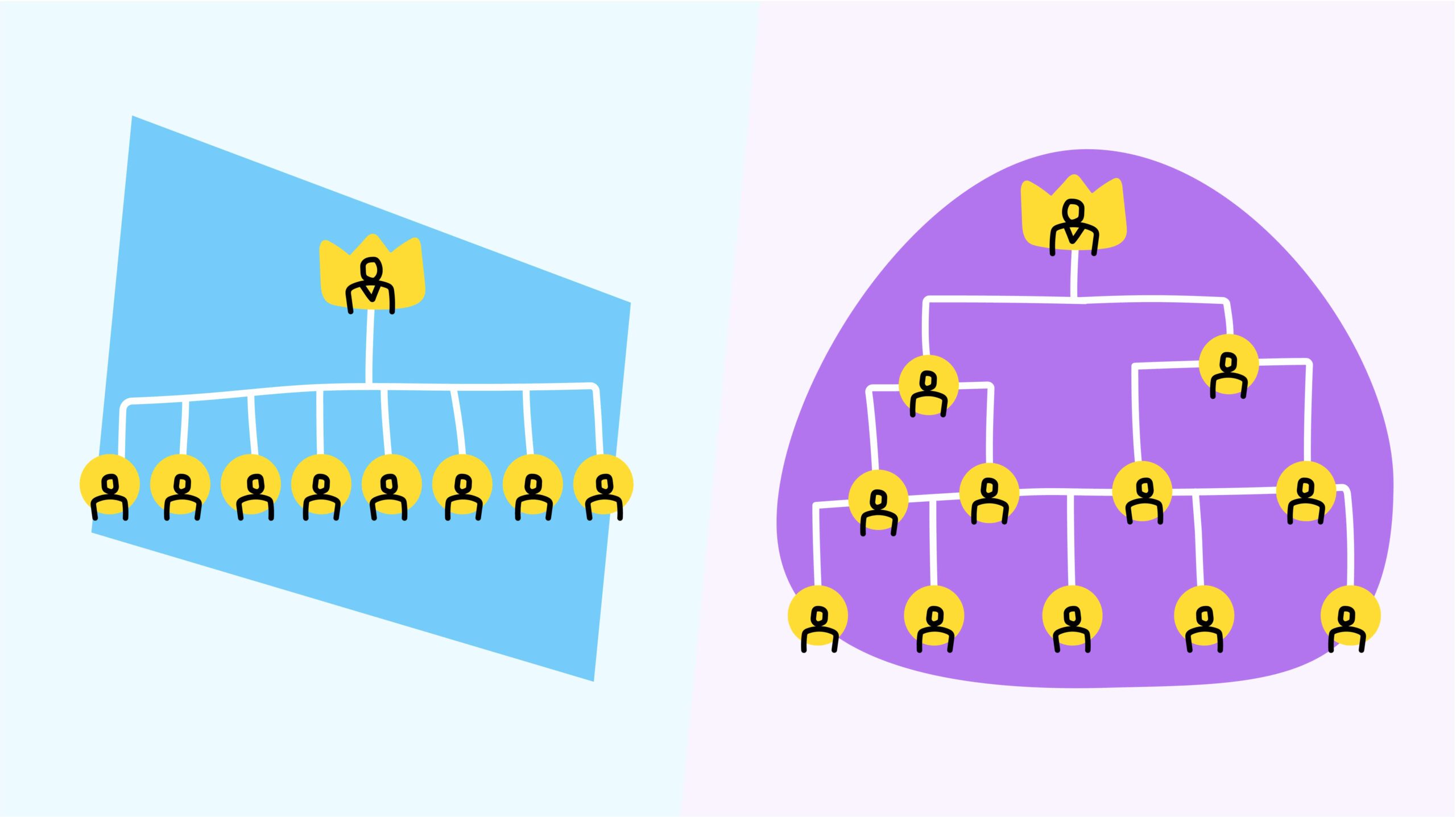
One of the most fundamental architectural decisions in tagging system design is whether to use a flat (single-level) structure where all tags exist equally, or a hierarchical (multi-level) structure where tags nest within parent categories. This choice dramatically impacts scalability, reporting capability, user experience, and maintenance burden. Neither approach is universally better—success depends on matching the system architecture to your specific data volume, reporting requirements, and organizational maturity.
Understanding the Fundamental Difference
Flat tagging systems present all tags at a single level with no parent-child relationships. A customer support system using flat tagging might have tags like: Billing Issue, Technical Error, Feature Request, Refund Request, Cancellation, Missing Documentation. Each tag stands independently; there are no relationships between them. When applying tags, users choose from a simple list.
Hierarchical tagging systems organize tags into multiple levels with clear parent-child relationships. The same customer support system with hierarchical tagging might structure tags as:
- Issues (Level 1)
- Billing (Level 2)
- Incorrect Amount
- Delayed Invoice
- Refund Processing
- Technical (Level 2)
- Login Errors
- Performance Issues
- Data Sync Problems
- Billing (Level 2)
This structure captures both the category (Billing vs. Technical) and the specific issue (Incorrect Amount vs. Delayed Invoice), enabling granular understanding of problems.
Flat Tagging Systems: When Simplicity Wins
Advantages of flat systems emerge when simplicity, speed, and consistent application matter most.
Easy and fast implementation is the most obvious advantage. Building a flat taxonomy requires minimal planning—list your top-level categories, implement them, and go. A team can deploy a flat tagging system in days. Hierarchical systems, by contrast, require deliberate planning about structure, relationships, and future expansion—a process taking weeks.
Exceptional tag application consistency results from fewer choices. With 15 flat tags to choose from, users apply tags more consistently and accurately than with a hierarchical system offering 50+ options. AI systems also perform better with flat taxonomies—fewer decisions mean fewer errors in automated tagging.
Superior performance and simplicity at the technical level come from flat structures. Database queries are faster; there’s no relationship management overhead; the data model is simpler. For organizations with limited technical resources, flat structures are dramatically easier to implement and maintain.
Ideal for low-volume scenarios under 1000 items per month where simple categorization suffices. If you’re tracking 200 customer support tickets monthly and need to know the volume by category type, a flat system provides exactly what you need without unnecessary complexity.
Disadvantages of flat systems become apparent with scale or complexity.
Limited reporting insight is the most significant drawback. A flat system telling you “42 billing issues this month” tells you volume but not why—are customers having problems with invoice accuracy, refund processing, or payment delays? You don’t know. This limits your ability to identify root causes or prioritize solutions.
Scaling problems emerge around 200-300 tags. What started as a manageable list becomes overwhelming as content grows. Adding 20 tags per month means 240 new tags annually—the system rapidly becomes unmanageable without hierarchical organization.
Inevitable overlap occurs with many flat tags. Distinguishing between “Product Issue,” “Quality Problem,” “Defect Report,” and “Hardware Failure” becomes difficult. Users must guess which tag is most appropriate, creating inconsistency.
Poor handling of multi-faceted content where items fit multiple categories. A single support ticket about “payment failure due to system downtime” is simultaneously a billing issue and a technical issue. Flat systems force a single-tag choice.
Hierarchical Tagging Systems: When Depth Matters
Advantages of hierarchical systems become apparent with scale, complexity, and reporting needs.
Granular reporting at each level enables root-cause analysis. Rather than “42 billing issues,” hierarchical systems reveal “18 invoice timing issues, 15 incorrect amount issues, 9 refund processing delays.” This specificity drives action. Teams can prioritize the 18 timing issues causing most complaint volume while other issues await solution.
Excellent scalability for high-volume environments (1000+ items per month) where flat systems become unwieldy. New issues naturally fit within existing hierarchical structure. Creating a “Payment Declined” issue under “Billing” doesn’t require restructuring the entire system.
Reduced tag confusion through structured organization. Rather than choosing among 50 flat options, users navigate to “Billing,” then choose between “Invoice Timing,” “Incorrect Amount,” or “Refund Processing.” Each decision point dramatically reduces cognitive load.
Clear representation of relationships shows how concepts connect and how categories organize. This structure makes sense to both humans and machines, supporting better AI-driven tagging and user understanding.
Flexible reporting at multiple levels enables different insights for different purposes. Executive dashboards show high-level category performance; operations teams drill into specific issues; individual contributors identify particular problems.
Disadvantages of hierarchical systems require careful consideration.
Complex initial planning is necessary to build logical structure. Misdesigned hierarchies force later restructuring—expensive and disruptive. Hierarchy design requires domain expertise and user research.
Difficult to reorganize once established. Moving “Refund Processing” from under “Billing” to under “Customer Service” breaks existing data relationships and requires migration. Organizations become locked into initial structure decisions.
Increased user cognitive load particularly in deep hierarchies (4+ levels). Users must navigate through multiple menu levels to reach their choice, risking disorientation. Nielsen research shows that flatter hierarchies (3 levels maximum) work better than deeper ones.
Higher implementation complexity and cost than flat systems. Building, deploying, and maintaining hierarchical systems requires more expertise and resources.
Decision Framework: Choosing Your Approach
The choice between flat and hierarchical should be driven by specific contextual factors:
Data volume is perhaps the most important factor. Organizations expecting fewer than 1000 items per month can usually manage with flat systems. Those exceeding 1000 items monthly should move to hierarchical systems before tag sprawl becomes unmanageable.
Reporting requirements determine what’s actually needed. If you need only summary counts by broad category, flat systems work fine. If you need root-cause analysis and specific insight into problem patterns, hierarchical systems are essential.
Structure complexity asks whether content naturally falls into neat, non-overlapping categories or whether items fit multiple categories. Simple, distinct categories suggest flat systems work. Complex relationships where items overlap suggest hierarchical systems better represent reality.
Current organizational stage matters. Startups prioritizing speed to market often start with flat systems, accepting future restructuring if growth demands hierarchy. Established organizations with documented processes benefit from upfront investment in proper hierarchical design.
Budget and timeline constraints are practical factors. Flat systems cost less and deploy faster (weeks vs. months). If your budget is $10K and you need deployment in 3 weeks, flat is the answer. If you have $100K and 3 months, hierarchical is justifiable.
Growth trajectory affects decisions. Declining or stable organizations can maintain flat systems indefinitely. Growing organizations should consider hierarchical systems now to avoid future painful migration.
User sophistication influences UX. Non-technical users unfamiliar with nested hierarchies prefer flat systems’ simplicity. Technical or trained users comfortable with hierarchical navigation find flat systems limiting.
Real-World Implementation: Support Ticketing Example
To illustrate the practical difference, consider customer support tickets using flat versus hierarchical systems:
Flat System:
- Tags: Billing, Technical, Usability, Feature Request, Documentation, Refund, Account, Performance
- Typical ticket: “Customer frustrated with login”
- Applied tag: “Technical”
- Monthly reporting: “50 Technical issues”
- Limited insight: High-level volume but no root cause understanding
Hierarchical System:
- Level 1: Issue Type (Technical, Billing, Usability, Feature Request)
- Level 2: Specific Issue
- Technical > Login Issues, Performance, Data Sync, API Integration
- Billing > Invoice Timing, Incorrect Charges, Refund Processing, Payment Methods
- Level 3 (Optional): Root Cause
- Technical > Login Issues > Password Reset Failures, Two-Factor Auth Problems, SSO Errors
- Typical ticket: “Customer frustrated with login”
- Applied tags: Technical + Login Issues + Password Reset Failures
- Monthly reporting: “30 login issues total; 12 password reset failures, 10 SSO problems, 8 two-factor auth issues”
- Actionable insight: Priority is fixing password reset (40% of login issues)
The difference is dramatic. The flat system reports 50 technical issues. The hierarchical system reveals that 30 of those are login-related, and 12 stem from password reset. This specificity enables targeted solutions.
Hybrid Approaches: Combining the Best of Both
Rather than viewing flat and hierarchical as either-or, sophisticated organizations combine both.
A hybrid approach uses hierarchical tagging for primary organization while adding flat tags for flexible cross-cutting classification. For example:
- Hierarchical hierarchy: Issue > Category > Specific Issue (primary organization)
- Flat supplementary tags: Urgency level (Critical, High, Medium, Low), Customer segment (Enterprise, SMB, Startup), Region (EMEA, APAC, Americas)
This enables both structured organization AND flexible filtering. An operations manager can filter by hierarchical path (all Billing > Refund issues) to understand patterns. A product manager can filter by flat tags (all Enterprise customers with Urgency=Critical) regardless of issue type.
Mega-menus and expandable navigation panels represent another hybrid approach, combining the visual organization of hierarchical menus with the accessibility of flat options.
Migration Considerations: Starting and Scaling
Organizations starting with flat systems often face migration challenges later. Key recommendations:
Start with the best choice for your current needs, recognizing you may need to migrate later. If you’re at 300 items/month with simple categories, flat is correct. Plan to migrate to hierarchical at 1000 items if growth occurs.
Design flat systems with future hierarchy in mind. Rather than “Billing-Invoice,” use “Billing-Invoice-Timing” to leave room for hierarchy. Flat systems that avoid monolithic names are easier to migrate.
Build hierarchical systems with sufficient flexibility. Design hierarchies assuming 10x growth. Hierarchies designed for 100 items often break at 1000. Build with scale in mind from day one.
Document assumptions. Record why you chose flat or hierarchical, what volume was assumed, and under what conditions you’d reconsider. This documentation guides migration decisions later.
Conclusion
Neither flat nor hierarchical tagging systems are universally superior. Flat systems excel at simplicity, speed of implementation, tag consistency, and performance with low-volume data. Hierarchical systems excel at reporting granularity, scalability, handling complex relationships, and organizational clarity.
The decision should be driven by your specific context: expected volume, reporting requirements, organizational maturity, and growth trajectory. Organizations with under 1000 items monthly needing only summary reporting should use flat systems. Those exceeding 1000 items monthly needing detailed insights should invest in hierarchical systems.
Most importantly, recognize that this choice isn’t permanent. As organizations grow and needs change, migration from flat to hierarchical is possible (though not trivial). Starting with the right system for your current stage while designing for potential future evolution ensures you have the tagging infrastructure supporting both today’s needs and tomorrow’s growth.