
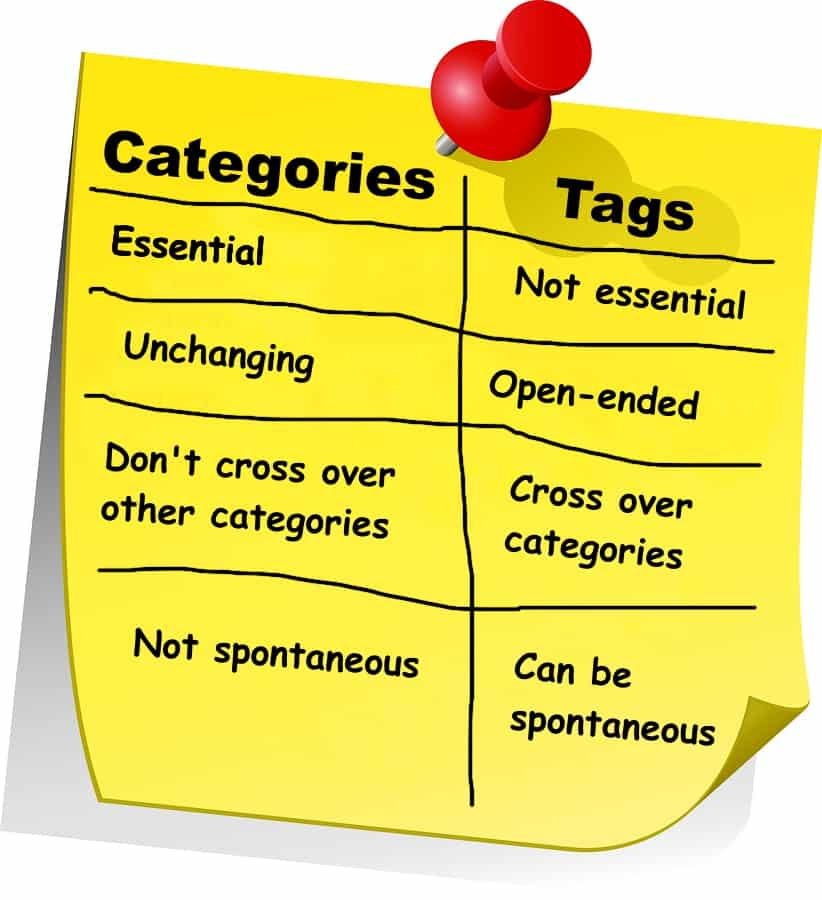
Tags, categories, and labels are fundamental organizational taxonomies used across content management systems, e-commerce platforms, and digital tools to structure information and improve discoverability. While these terms are sometimes used interchangeably, each serves distinct purposes in organizing content and enhancing user experience. Understanding their differences and applying them strategically is essential for maintaining a clean site structure, improving search engine optimization, and guiding visitors to relevant content efficiently.
Core Definitions and Functions
Categories function as the primary organizational framework for grouping related content into broad topic areas. They are hierarchical in nature, allowing for parent-and-child relationships. This structure enables you to create a logical progression from general to specific topics. Categories typically appear prominently in website navigation menus, sidebars, and as the foundation of site architecture. Think of categories as the table of contents of your website—they tell search engines and users immediately what your site covers and provide an overview of available content sections.
Tags operate differently from categories by providing a more granular, descriptive layer of metadata. Unlike categories, tags are non-hierarchical and flat—there is no parent-child structure. Tags allow you to highlight specific details and nuanced characteristics of content without being confined to predefined organizational structures. They function similarly to index words in a book, connecting related posts across multiple categories based on shared keywords or themes. For example, in a travel blog organized into categories like “Destinations” and “Travel Tips,” you might use tags like “budget travel,” “solo travel,” and “Southeast Asia” to help readers discover related content regardless of which main category a post belongs to.
Labels represent a more contextual and flexible organizational approach that varies significantly depending on the platform and use case. In many systems, labels function as internal metadata not visible to end users—serving purposes like workflow management, content status tracking, or administrative organization. Labels might indicate whether content is “in draft,” “published,” “needs review,” or relate to campaign names, audience segments, or priority levels. In some contexts, labels are functionally synonymous with tags, while in others they serve a distinctly administrative purpose.
Key Differences Across Dimensions
Structure and Hierarchy: Categories support hierarchical organization with subcategories nested under parent categories, creating a tree-like structure. Tags maintain a completely flat structure with no hierarchical relationships—each tag exists independently at the same level. Labels can vary by platform but generally follow either a flat structure similar to tags or serve as fixed metadata fields.
Assignment Requirements: Categories are typically mandatory in content management systems. WordPress, for instance, requires every post to belong to at least one category. If you don’t assign a category, the post defaults to “Uncategorized.” Tags are entirely optional and should be applied strategically only when they add genuine value. Labels similarly are optional but may be mandatory in certain workflows or systems where they’re used for critical administrative functions.
Quantity and Application: The recommended approach is to create and maintain 5–10 total categories for your entire site. This limited number keeps your site focused and prevents user confusion during navigation. In contrast, you can assign multiple tags—typically 2–5—to individual posts without overwhelming the organizational system. The total number of tags across a site can grow much larger (200+ tags for a medium-sized blog) because they serve a different function. Labels follow similar principles to tags, varying in total quantity depending on the system and use case.
User Interface Placement: Categories prominently feature in main navigation menus, header sections, sidebars, and breadcrumb trails because they form the structural backbone of site navigation. Tags typically appear at the bottom of posts or within sidebars as supplementary discovery aids. Labels, when visible to users, appear contextually within content management interfaces or next to individual items but rarely in primary navigation elements.
SEO Impact and Search Engine Considerations
Search engines use categories to understand the broad topical structure of your website, which aids in proper indexing and crawlability. Categories help Google recognize what your site is fundamentally about and organize your content into logical thematic clusters. This structural signal supports your site’s overall topic authority and helps search engines determine whether your site is relevant to certain queries.
Tags have a more limited direct SEO impact than categories. According to Google’s John Mueller, tags are not a primary ranking factor, though they do serve important user-experience functions by helping visitors discover related content. Tags can indirectly support SEO by creating internal linking opportunities between thematically related posts, which improves crawlability and user engagement metrics like average time on page.
The consensus among SEO professionals is that both categories and tags contribute to SEO success indirectly through improved site organization and user experience rather than through direct ranking signals. Search engines prioritize content quality, relevance, and authority over taxonomy optimization. However, a poorly organized site with confusing categories and tags creates friction for both users and search engine crawlers, which can harm performance. Conversely, a well-structured taxonomy with clear categories and strategic tags enhances user experience, reduces bounce rates, and creates natural internal linking opportunities.
Practical Use Cases and Implementation
Blogging: In a food blog, you might establish broad categories like “Recipes,” “Restaurant Reviews,” and “Cooking Tips.” These categories would appear in your main menu and organize your content at the highest level. Tags would then describe specific details within posts: a recipe post might have tags like “vegan,” “gluten-free,” “30-minute meals,” “weeknight dinner,” and “budget-friendly.” This tagging strategy allows readers searching for all vegan recipes—regardless of which category a post falls into—to find relevant content quickly.
E-commerce: An online fashion retailer typically uses hierarchical categories such as “Men’s Clothing” → “Shirts” → “Casual Shirts,” creating a logical browsing experience. Tags then describe product attributes that cross categories: “cotton,” “organic,” “waterproof,” “eco-friendly,” “machine-washable.” This approach allows a customer interested in eco-friendly clothing to filter across all categories and find relevant items.
Project Management and Workflow: Labels serve administrative functions, indicating project status (In Progress, Review, Completed), priority level (Critical, High, Medium, Low), team assignments, or campaign associations. Labels enable quick filtering and reporting on work status without affecting the core organizational structure.
Social Media Content Management: Labels provide internal organization for social media teams to track content performance, segment audiences, or manage campaigns—none of which are visible to external followers. This system allows teams to report on performance by label (e.g., “How did our #BlackFriday posts perform?”) and automate certain publishing workflows.
Common Mistakes to Avoid
The most frequent error is creating too many categories, which clutters navigation and confuses users. Stick to 5–10 well-defined categories that clearly represent your content scope. Another mistake is redundancy between categories and tags—if “Travel” is a category, don’t use “Travel” as a tag. Reserve tags for specific details and cross-category connections.
Over-tagging represents another common pitfall. Creating unique tags for every individual post title or using tags that appear on only one or two posts wastes organizational effort and dilutes the value of the tagging system. Every tag should represent a topic you cover repeatedly and that multiple pieces of content will share.
Additionally, failing to write tag and category descriptions can harm SEO performance. While these pages may seem minor, thin or completely empty category and tag archive pages can be flagged by search engines as low-value. Adding meaningful descriptions to these archive pages improves indexing and helps visitors understand the content within.
Finally, assigning multiple categories to a single post is generally discouraged despite being technically possible. This practice creates duplicate content issues, dilutes keyword signals, and confuses search engines about which category is primary. If you find yourself needing multiple categories, consider using tags instead or restructuring your category hierarchy.
Implementation Strategy: A Step-by-Step Framework
Begin by planning your category structure before publishing content. List the 5–10 major topic areas your site will cover. For a cooking blog, these might be: Appetizers, Main Courses, Desserts, Beverages, Cooking Techniques, Ingredient Spotlights, Kitchen Equipment, and Restaurant Reviews. Ensure categories are mutually exclusive to prevent overlap and confusion.
Next, establish clear naming conventions for both categories and tags. Use descriptive, user-friendly names that visitors intuitively understand. Avoid technical jargon or abbreviations. Make decisions about capitalization and formatting (e.g., will you use “Main Courses” or “main-courses”?) and apply them consistently.
Create a tagging strategy document for your team that outlines when tags should be applied, how many per post is appropriate, and what kinds of topics warrant tags. This document becomes your reference guide when publishing content and helps ensure consistency across your site.
When publishing, assign one primary category to each piece of content—the category that best represents the post’s main topic. Then add 2–5 relevant tags that describe specific details, target keywords for niche searches, or represent secondary themes within the post.
Finally, audit and refine regularly. Review your category and tag usage quarterly. If a category contains very few posts while another is overwhelming, consider restructuring. If you notice tags that appear on only one or two posts, consider removing them. Archive outdated categories and consolidate redundant tags as your content grows.
Choosing the Right Taxonomy System for Your Platform
WordPress offers built-in support for categories and tags but allows customization through plugins if you need additional fields or labels. The platform’s mandatory category system and optional tag structure align well with best practices for general blogging.
WooCommerce e-commerce sites use product categories (hierarchical), product tags (flat), and product attributes (fixed properties like size or color)—providing a three-tier taxonomy system ideal for retail environments.
Social media management platforms like Brandwatch use labels as internal organizational tools for content scheduling, campaign management, and performance reporting, completely invisible to external audiences.
Project management tools like GitLab employ both group-level and project-level labels, allowing organizations to maintain consistency across teams while preserving project-specific labeling flexibility.
Tags, categories, and labels each address specific organizational needs, and their effectiveness depends on strategic, consistent implementation rather than overuse. Categories establish the foundational architecture that guides both users and search engines through your content; they should be limited, hierarchical, and prominently featured. Tags provide granular connectivity across categories through shared themes and details; they should be strategic, relevant, and applied only when they enhance discoverability. Labels serve administrative and internal organizational purposes, tracking status, workflow, and custom attributes without compromising site structure.
The key to optimal organization is understanding your content scope, planning your taxonomy before implementation, and then maintaining discipline in applying these organizational tools consistently. A site with 8 well-chosen categories, 150 strategically used tags, and clear labeling practices will outperform a site with 30 categories, 500 redundant tags, and inconsistent labeling—demonstrating that structure and restraint in taxonomy design yield better user experience, stronger internal search performance, and improved search engine optimization.